
NordCarolina Blog
Formerly BoostMoose.com
Misc. Project - Volvo P3 Desk Chair
Foreward
I am in the process of upgrading my desk setup as my current Ikea desk with a piece of plywood over it and a gaming chair isnt the best look in my house. Given the costs of “professional” desk chairs designed for taller people I decided to take it upon myself to build one from a Volvo seat. The project was actually much easier than I thought, and If I had to build another there are a few changes I would make.
Prerequisites
Tools you will need:
Angle grinder
Bench grinder (to remove burrs) or grind stone for angle grinder
Wire strippers
Misc. Torx and metric sockets
Flat blade screwdriver
Straight blade pick (I use the $1 ones from Harbor Freight)
Drill and 1/4inch drill bits (you can use whatever size you like, 1/4 was easy and fit through the stock frame holes)
Paint (I used STEELIT)
Items to purchase:
Volvo P3 seat. This can come from any model, the bases are all the same. Heated seats can be found in most models, heated and cooled seats can often be found in S80s.
Desk chair with basic base. Some desk chairs have multiple adjustments and plastic bases. I went with the most basic, free desk chair I could find on Marketplace. You want to also find one with the lowest rise you can, as the base of the car seat adds significant height which shorter people may find uncomfortable.
1/4in. thick steel bar stock / rectangular steel tube. I will touch more on this in the build details, however Stock Car Steel and Aluminum can cut and ship any size of steel you need for your projects without needing to visit a mill or buy huge pieces of steel!
Build Process
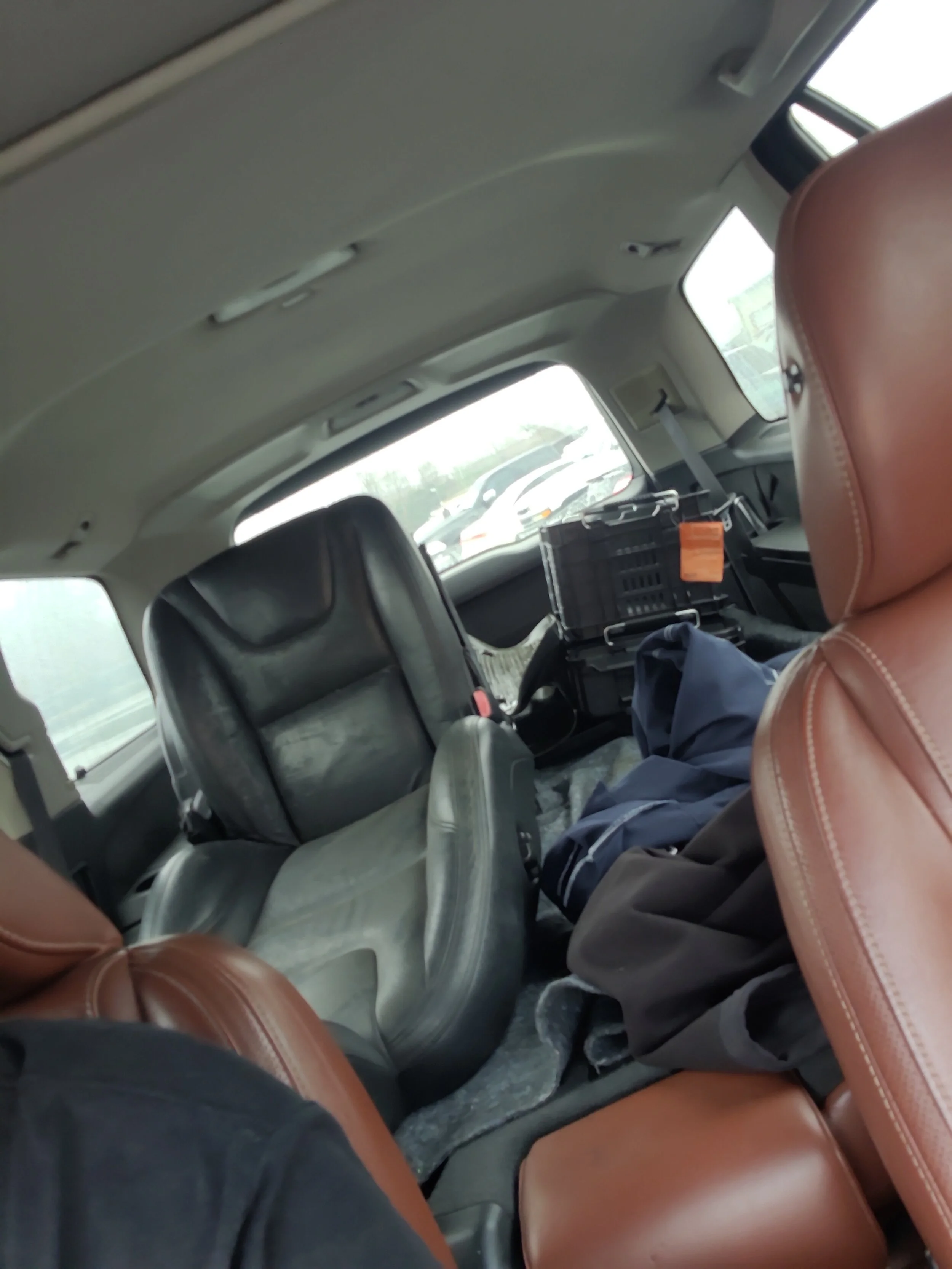
I started this build with the seat! These are relatively easy to find depending on where you are in the country. I went to a local DIY pull-a-part junkyard and paid $40 for my seat. The seats are held into the car with 4 bolts under plastic covers. I then used snips to cut the wires going to the harness of the seat, so I had wires to work with. The seatbelt an be unbolted from the seat frame, or in my case I just cut the seatbelt with my snips since I wasnt going to need it. This seat was not heated or cooled, so I will not be going into adding controls for those functions.
With the seat loaded up in my XC90 I headed back home to start prepping the chair for minor modifications.

I will be reusing this image, but the harness bolts into the chairs female harness, the wires usually come wrapped in tesa tape which I removed. I kept about 8 inches of pigtail harness.
With the seat now removed from the car, the first modification is making the rails completely flat. Each end has a bracket that is welded onto the slider so it can bolt into the car. With my design I needed these out of the way, leaving a perfectly flat rail on each side of the seat.

FOR VISUAL REPRESENTATION, THE SEAT DOES NOT NEED TO BE REMOVED FROM THE RAILS
I didnt take any of my own photos for this project (so I am using this photo of P2 rails which are close). There are brackets on each corner that I used my angle grinder to cut off from the rails. These only take a few minutes to cut through and make the bottom of the seat perfectly flat.
Once I had this done, I moved onto testing and fabricating the electronics to make the power functions work. On the P3, this is very easy and consists of a 12v power, a 12v signal wire, and a ground. I would consult the Volvo wiring diagram for your own seat to confirm which wires are needed, so for this case this applies to all 2011+ S60s (and probably V60s).
Here is the diagram I followed with my notes on what you need:

74/31 is the 20 pin connector that runs from the car to the seat. The only 3 pins you need to worry about on the car side of the harness are pins 14, 15, and 16.
Pin 14: Blue / White is a signal wire from the CEM, this is a signal to the Stop Logic to allow the seat to move. Connect 12V to this wire.
Pin 15: Brown / Red is 12V power to the seat control module (3/27). Connect 12V to this wire.
Pin 16: Black / Green: This is ground for the module.
A side note regarding the other pins, SRS module, and air bags:
There is some concern by some that there is a danger in not removing the air bag from the side of the seat. The route I went to avoid incidents was to remove any and all wiring in the pigtail going to these modules. All of the pins outside of the 3 listed above can be removed, and is why the small straight pick is listed in the parts list. You can remove the small red caps from each pin and use the pick to lift the clip and slide the pin end out. Additionally, the airbag firing system needs a signal from the OWS or Occupant Weight Sensor. Going off the wiring diagram, if the OWS does not have power, even if power was sent to the airbag firing system it would not deploy since it needs the circuit completed by the OWS signal.
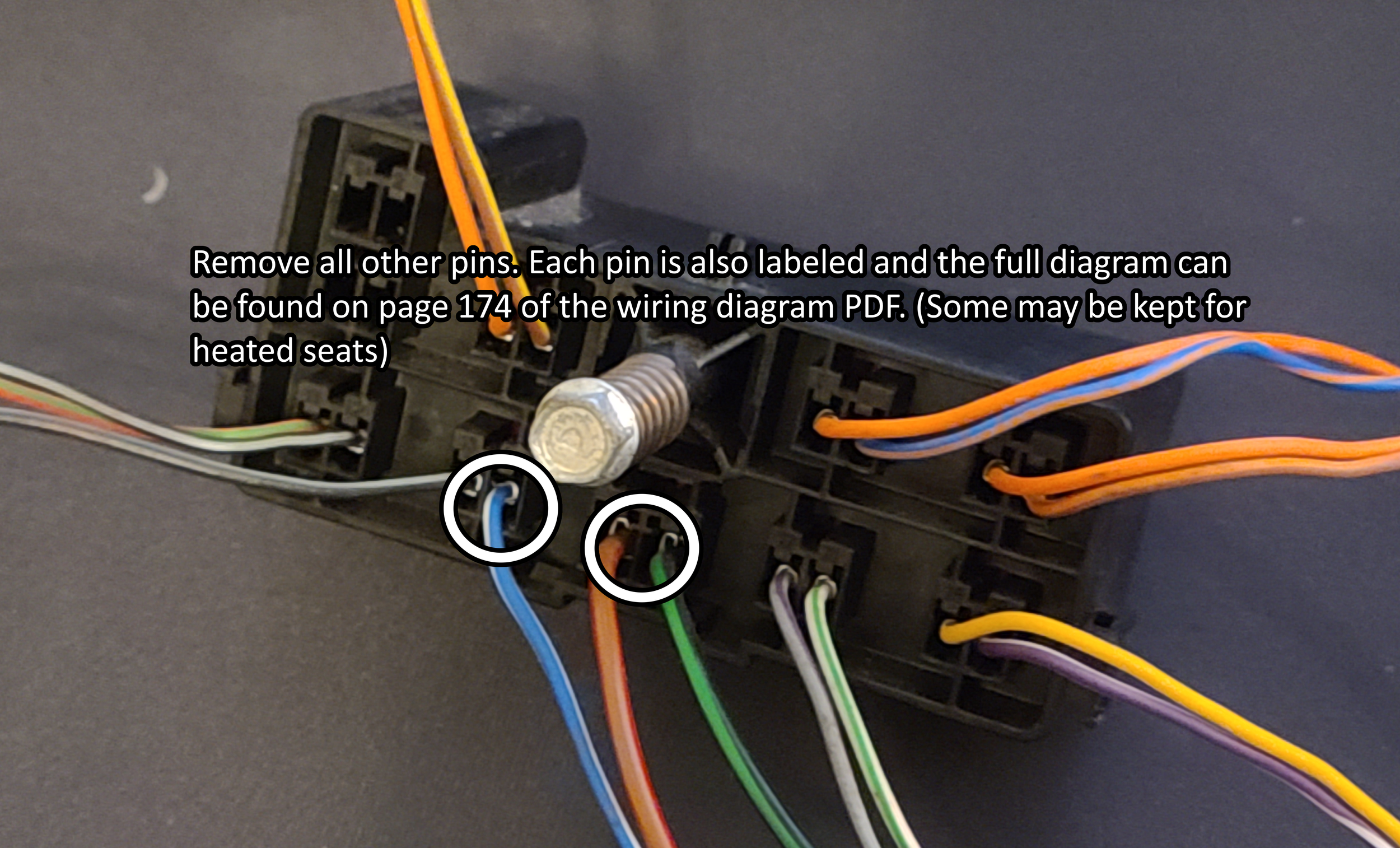
Be sure to remove the black/grey cable next to the white/blue cable as it is part of the airbag firing system!
Now you may be asking yourself well how do I apply 12V to these wires when the walls in my house put out 120V AC? Well for that we need the cheap adapter brick I linked at the top of the page. The unit I bought came with a barrel jack to screw terminal adapter which we will connect the 3 wires from out pigtail into.

I trimmed about 1/2in. from the end of each wire with my wire strippers, and twisted the 2 positive wires together at their end before inserting them into the connector. I put some electrical tape over everything before tucking it up into the seat just for extra protection. The power brick I then attached under the seat with some zip ties and tucked all the wires away.
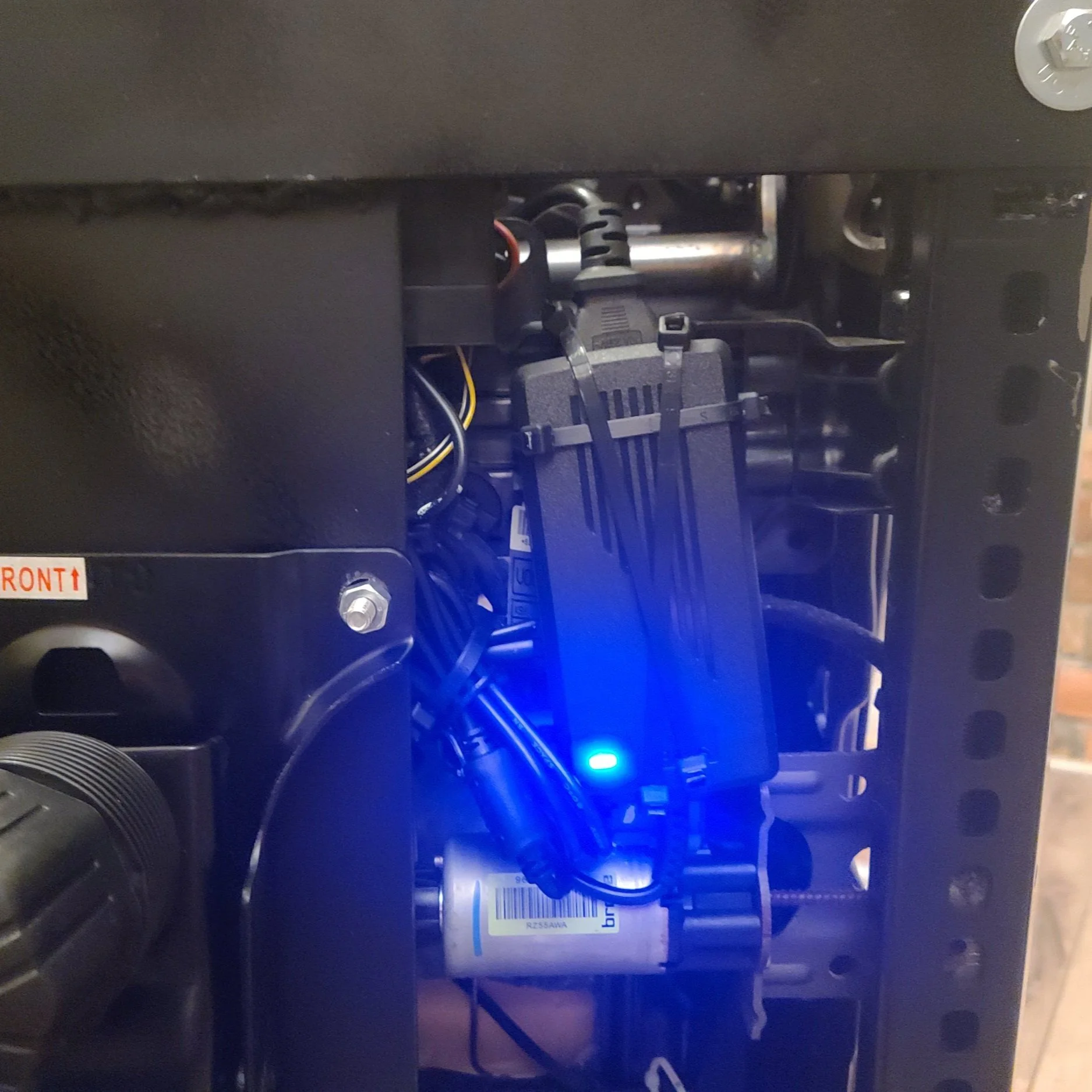
The power brick, zip tied under the chair inside the original seats rails with the other components.

The de-pinned connector to the seat.
With the electrical fully sorted, I then turned my attention to mounting the seat to the rolling chair base. I made sure to pick a donor office chair that had minimal adjustment points, and a standard 4 bolt base. Some higher end chairs have multiple pivot points and more complicated bases. I used a piece of ~8inch wide by 1/4inch thick steel flat bar. (Measure your base width before buying material) I went with what I had on hand at work in our scrap bins, otherwise I think I would have gone wider for stability. I then measured the distance between the rails both front and back and cut two more pieces of 2inch by 1/4inch steel flat bar to make my cross members. I mocked everything up with the seat sitting on the metal and the metal on the chair base so I could line everything up properly and make marks on where I needed to drill mounting holes and where the cross bars would need to sit. I did not do any crazy measurements here, just got everything looking “right” and marked parts with a paint pen so I could disassemble and bolt / weld everything together.

I (poorly) welded my brackets, however bolts could also be used to hold the cross members in place.
Here is the bracket mid construction. I still needed to drill the holes for the rails to bolt to, and I gave it a coat of flat black STEELIT paint. I also ended up flipping the bracket over in installation to lower the seat rails a bit to buy myself some lower seating position. Like I have previously mentioned these chairs sit very high compared to a standard chair due to all the motors underneath them, so choose your base chair wisely.

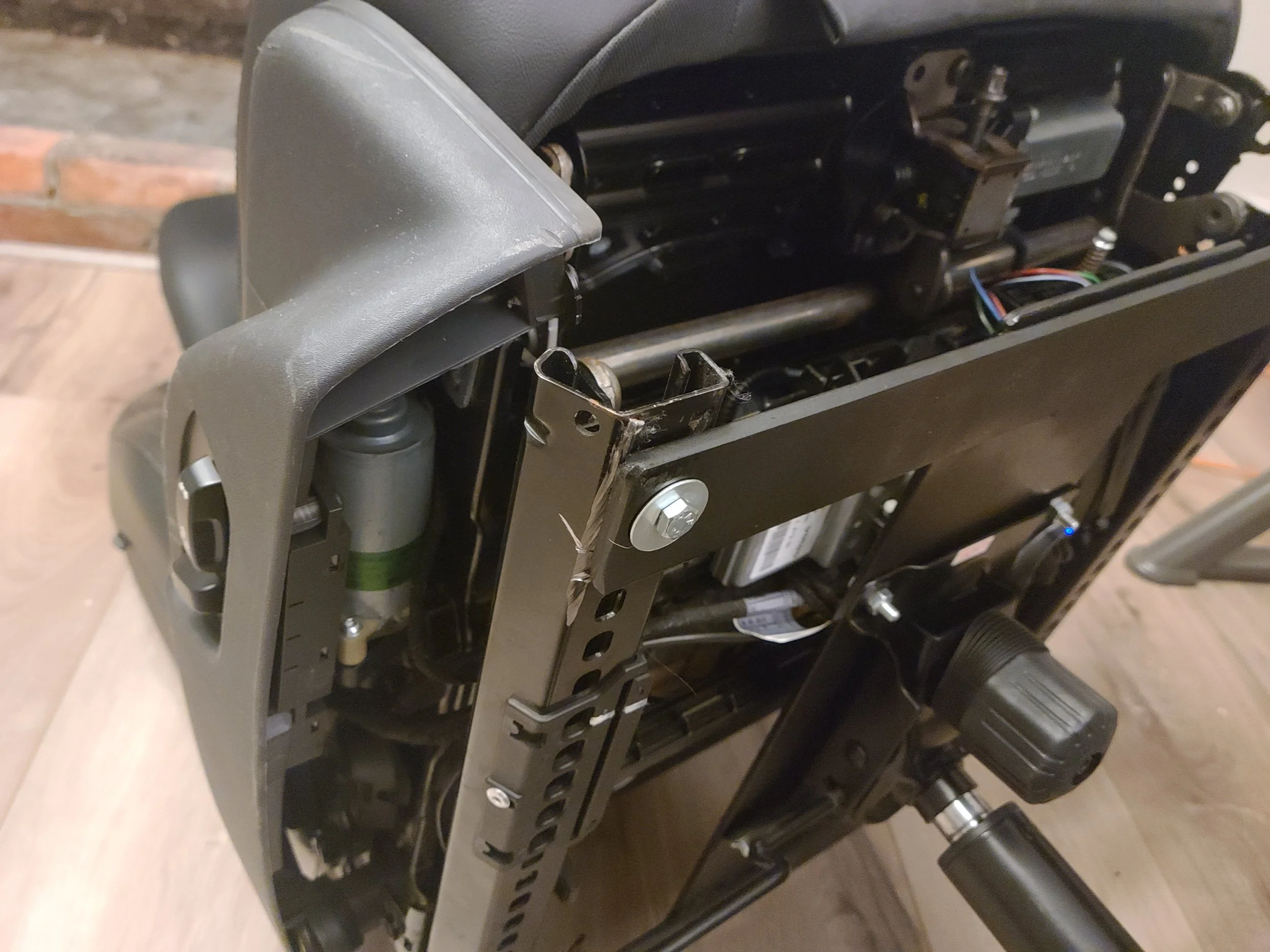

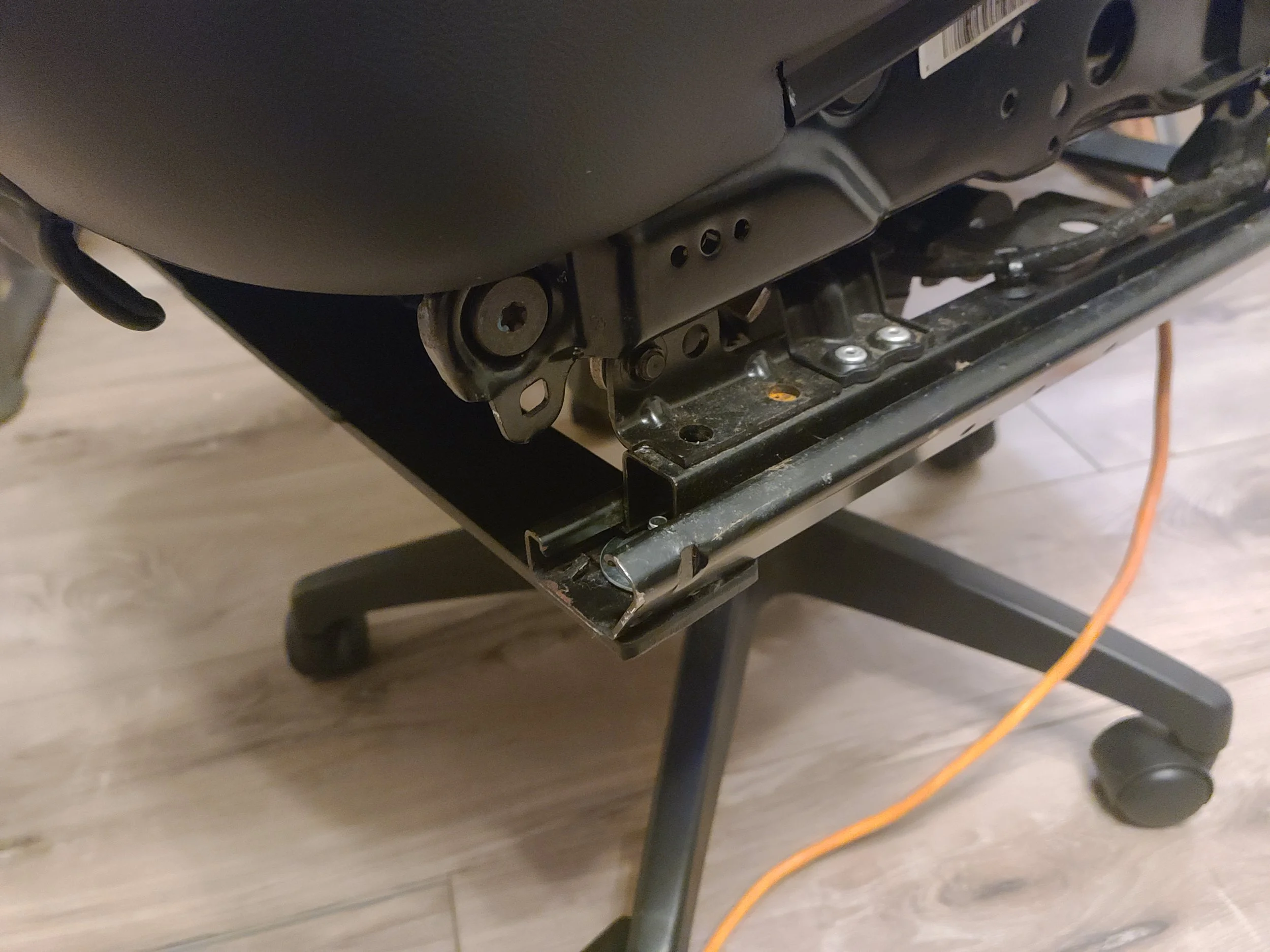
All of the hardware used was 1/4 inch bolts from Lowes. I also used some stacked washers on the front bolts for the frame rail since the hole for the original bolts in the car are quite large.
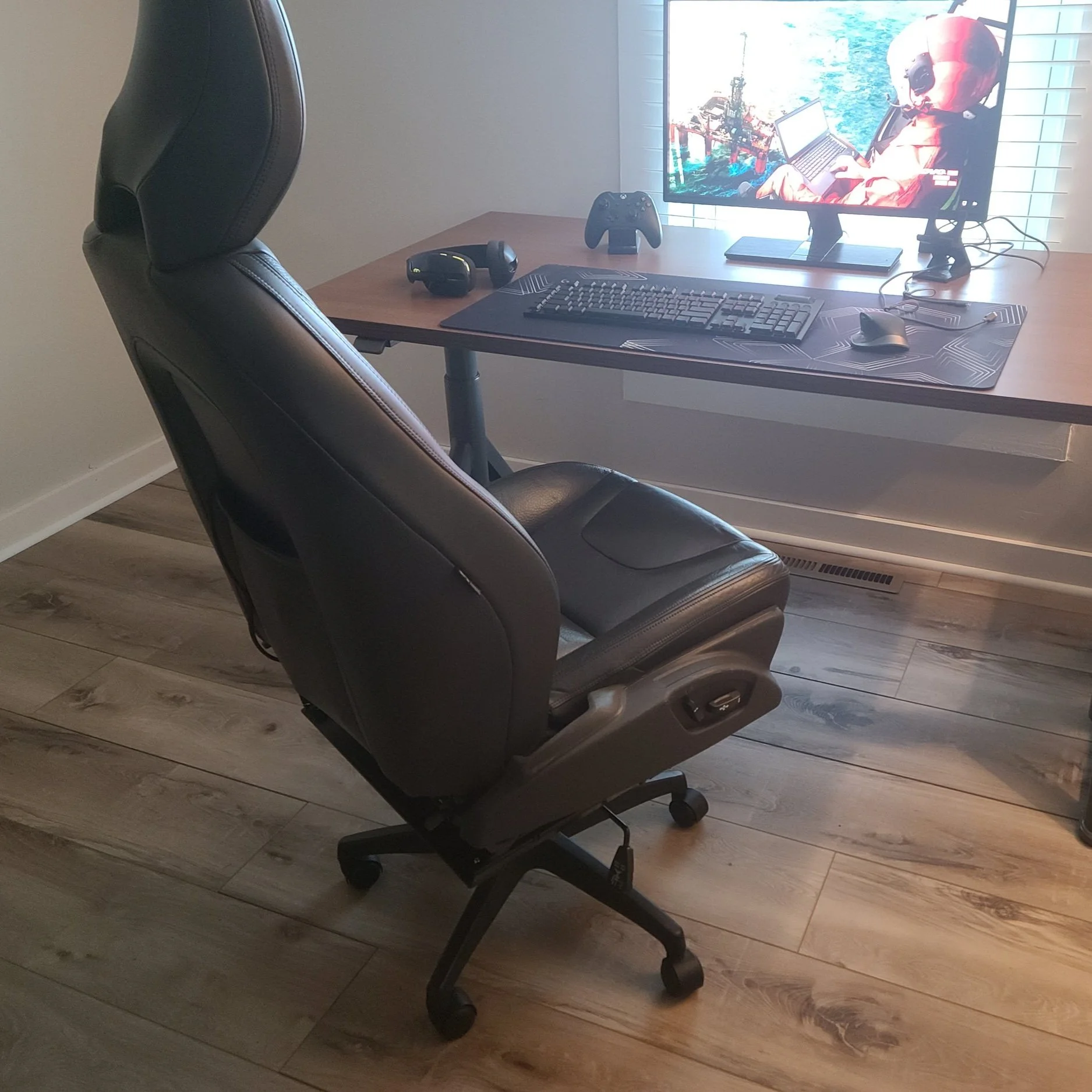
The last thing I did was run an 8ft "designer” extension cord out of the back of the seat from the power adapter and left all the slack in the seat back pocket. This will allow me to plug it into my desk without having to run the long extension cord from my wall to the chair, and it can be neatly tucked away inside the seat back pocket when not in use.

Conclusion:
There are a few things I would change about this build. The first thing is that I would have used a mild rectangle steel square tube instead of flat bar for the cross members. With the way I flipped the bracket upside down this would NOT have added any extra height but would have added some extra stability side to side. Additionally a higher quality base would have been nice to use as there is some play with the sheer amount of weight its now carrying. Lastly, I still plan on adding arm rests using some generic bolt on arm rests from Amazon, I just need to get around to ordering them and possibly adding some more brackets to allow them to attach where I need to.
I hope you all enjoyed this little project, it completely blew up on Reddit which I did not expect! For a 2 day project that I sort of made up as I went I am very pleased so far with the outcome. If you have any suggestions please feel free to leave them down in the comments.
The Definitive P2 XC90 External Transmission Cooler Writeup
FOREWORD
If you have a 2007+ V8 (or 3.2) Volvo XC90 and plan on towing, one of the first things youll find is pages upon pages of forum threads talking about transmission fluid and cooling. This guide, I hope, will serve as a definitive guide for someone looking to install an OEM transmission cooler for cheap!
Please note: If your car was equipped with the Tow Package from the factory. This cooler will have already been installed.
PREREQUISITES
For this project you will need the following tools and materials:
Impact gun OR wrench + socket set with various metric sizes.
Various torx bits.
Various phillips and flat blade screwdrivers.
Trim / Bone tool (non-marring scrappers also work).
Harbor Freight U-Clip and Screw Pack
Not needed if necessary u-clip is removed from donor vehicle.
Long Reach Funnel (I used a specific one from IPD designed for reaching transmission fill holes).
Hose Clamps
3/8ths Hose to -6 AN Female Fitting
Optionally a 3/8ths Barb Fitting can be used, however I went with AN fittings since it makes it easier to separate the lines to do fluid changes.
5 or 10 Quart Measuring Buckets (Easy to find at almost any hardware store).
OEM Volvo XC90 Transmission Cooler with lines.
Things to note: You can easily find these on all T6 models as they came standard from the factory with this cooler. They will have one line that runs from the top of the radiator cooler down to the unit, unclip this from the top and leave clipped in at the bottom. The return line from the external cooler to the transmission is extremely hard to unbolt, so we will cut this line as far down as possible towards the transmission.
I found that squeezing the clips and gently twisting the hose allowed it to pop free easily without a single broken clip anywhere along the install and test fitting process.
This unit can be purchased new from Volvo here, however this is expensive and also requires unbolting the lines from the transmission to install. the replacement return line from the cooler.
Guide
Throughout this guide, I may make references (and link to) other guides on Swedespeed and other various forums. This will be done to save myself time, and often these guides have better photos for the task at hand. This guide is also being written with the assumption that the end user has basic mechanical knowledge, and is familiar with their vehicle to some extent. This is NOT a hard project, and can be done using almost all basic hand tools. Additionally, if the parts mentioned have been pulled from a junkyard vehicle, much of the process is the same, just in reverse. This guide may help you in removal of the donor unit if followed in reverse order.
To start, lets begin with removing the front bumper of the vehicle. I followed this guide here. (NOTE: Do NOT follow the guides way of removing the headlights, there is a main harness connector further down from the lamps that can be disconnected to remove the headlights without unplugging the harness from the unit itself!) I used a strong non-marring plastic tool to pop the corner clips close to the fender, they were very strong! And helps to work at them slowly, releasing a tab one at a time. The two clips under the bumper were destroyed in my process (which is why I bought the cheap set of automotive clips from Harbor Freight). With the bumper off you should be left with this:

Next we will remove the lower metal skid plate to give us better access to the hoses and bolts. I used a deep socket for these as they have 3 bolts on each side, with one being up inside the front structure of the car.

With this skid plate out of the way you will have easy access to the transmission lines as well as the mounting points for the cooler. Lets begin mounting the cooler in place without the hardlines installed. You need to remove the 2 bolts that hold up the power steering fluid cooler. The external transmission cooler sandwiches between the various radiators and coolers, and uses the same bolts as the PS cooler.

Now that the cooler is mounted in place, you can disconnect the return line from the top of the radiator-integrated ATF cooler. The diagram below shows how the new lines will be run.

This diagram shows the flow of fluid as it completes its loop out of the transmission and into the coolers. Top is stock, bottom is the route with the tow package / cooler.

We can now focus on prepping our modified return line that will bring the ATF fluid from the external cooler back into the transmission. This is where the AN fittings I used come into play. I chose AN fittings due to their availability, as well as ability to hold fluids at various temp ranges and pressures. This also allows me to disconnect the lines at any point for a fluid flush without having to remove any hose clamps. I added a 3/8ths barb to -6 AN Female fitting to the cut off end of the return line that will go out of the external cooler and into the transmission.

Now we can connect the two lines to the external cooler. The inlet hose and the outlet (return) line. We are going to use the unterminated return line as a drain line for doing the ATF flush.

The two brackets on the cooler lines should line up together, and there is only one way for them to sit next to each other. This is where you will need the u-clip and screw, as it holds these two brackets to the plastic mounting point on the radiator assembly as pictured above.

While the system was apart this is the perfect time for an ATF flush. The external cooler adds extra capacity to the system, so new fluid is needed anyways. I followed this guide on Swedespeed, but instead of using a hose out of the outlet of the built in radiator cooler, I bent the outlet hose of the external cooler down into a bucket. I did 2.5 liters at a time, as a lot of fluid gets “stuck” in the torque converter when its running.
https://www.swedespeed.com/threads/how-to-xc90-6-speed-transmission-fluid-flush.204760/
Once I was happy with the level of fluid in the system, I went to the last modification step which is cutting the OEM return line to add my AN fitting. if you refer to the diagram earlier in the post you will know that we have to connect the outlet line of the external cooler to the original return line to the transmission. For this I cut the line fairly close to the metal end, and added a 3/8ths barb to -6AN Male fitting.

My hose clamp on the male end wound up over some of the hex of the fitting but it did not affect the intall.
You can use a standard wrench to connect these, or a specific AN wrench. Either way, with the two ends threaded together we now have a complete loop of the system. Make sure to put the car in reverse and drive a few times to make sure your ATF fluid level is okay. Add more if needed.
With this all done it is time to do all the steps we took in disassembling the car but in reverse. Adding the skid plate back, then the bumper and headlights. You have now installed an OEM cooler for pennies on the dollar compared to buying it new or having a shop or dealer install it for you!
As always, if there is anything you think I missed, or any recommendations please feel free to leave them in the comments or share your install process.
TFT Display with P3Tool Guide
Just writing that blog title filled me with a sense of dread. The TFT cluster swap is a topic so thoroughly discussed on the forums that I am scared to even open that can of worms on this website. Not only is it a slightly complicated mess, but often when I do write ups I try to be as technical and cover as much of the topic as possible meaning this could turn into a LONG post. So buckle up cause this is gonna be a nerdy one
Introduction
The TFT cluster swap is a common modification for the P3 chassis Volvos to update the original “watch face” style gauge cluster (also referred to as a DIM, or Drivers Information Module) to the facelifted digital style found in the 2014+ models. This applies to all P3 chassis cars like the V70, S80, XC70, XC60, and S60. The V60 is left off this list as it was only sold in the US from the 2014 MY onwards and as such already has the TFT display.
The digital cluster is preferred since it adds back in some information for the driver like engine temps, as well as offering different display themes (some of which can be modded and changed further with editing tools). Since it shares the same shell as the pre-facelift DIM, they are a near “plug and play” swap when it comes to physically installing it into the car.
These updated DIMs can often be found on eBay and now even in junkyards as these cars become older and sent to dismantlers.
Prerequisites, Parts, and Supplies
Before we start taking stuff apart and soldering wires, lets get all of the items we are going to need / use for this cluster swap.
Hardware
Windows PC laptop
Volvo DICE unit
Battery tender
2014+ TFT Display (multiple part numbers available*)
2 Volvo cluster pins (I took these from a P1 cluster, more on this later).
Soldering Iron
Torx Bits
Pick / Pinning Tool
20 AWG Wire
(Optional) Replacement Instrument Panel Glass Lens (31376800)
Software
Cars CEM PIN Unlocked
Up to date DICE drivers
P3Tool w/ active license
And here is the part where I would have a well written and photographed step-by-step instructions on the rest of the process, however…
The Swap
I started working on this article in January of 2023, it is now mid August of 2023 and I have still to “finalize” this swap. That being said there are some updates now later in the year, and I do in fact have the cluster installed. In the August update of P3Tool Johnny added full functionality to do the TFT swap and even included tools to rewrite software on the TFT to better get them to work on various models. I did not end up taking photos of my process for the install, luckily this is a very well known process and there are multiple guides online you can follow to do the wiring and physical install of the cluster.
The TFT I refurbished is a V2 model, these can be identified by the additional venting on the rear.

The “V1” Model without venting

“V2” Model with Venting

“V3” Model only found in very late model XC60s
The TFTs got progressively better with the later model years, with slightly faster CPUs and slight quality of life updates. Any of these can be used as they are all the same size and use the same plug.
I followed all the instructions online for the hardware side of things, taping into the two wires from the ODB2 port, etc. Got the cluster installed and went to work in P3tool. This is where I will share how my install went and the changes I needed to make to ensure everything was working.
First we need to set some parameters, these are in parameter number order so some may not be applicable or wanted for your install:
P#013: Screen Skins
0x04 = R-Design
P#040: DIM Type
0x02 = DIM Type Basic LED
P#101: TPMS
0x01 = Without TPMS
P#112: Indirect TPMS
0x01 = Without indirect TPMS
P#247: Fueltank Sensors
0x01 = Fueltank, 1 sensor
The DIM type change is required, along with the Indirect TPMS and Fuel Tank Sensors. I have TPMS disabled on my car since I am using wheels from a V90 without TPMS sensors in the valve stem. Some of the TFT clusters come from cars that do not use TPMS but rather iTPMS which measures the rolling diameter of the wheels to determine air pressure. I had a permanent TPMS light on the TFT until I switched parameter 112 off Undefined. Additionally the TFT uses data from parameter 247 which is 1 sensor for FWD, and 2 sensors for AWD. Without this, the fuel gauge will either not read or read improperly. (I am still working through testing this.)
Next, lets move over to the new P3 DIM tab in P3Tool.
Here we will begin to prep the old cluster for removal (they can function fine with all of these parameter changes made, and even the extra wires into the plug).

Here is the step by step instruction:
Read Milage from original DIM
Read EEPROM from original DIM
Full Backup of original DIM
Install new TFT DIM
Full Backup of TFT DIM
Select Fuel Tank Model (Select based on FWD or AWD)
Select Model Year of your car
Select Base Flash
Click Write Flash
The DIM will go blank as the data is being written to it. Once it is done, it should light up with everything working. Make sure to reset the SRL and set the Time before unplugging as these can not be done without Sensus (in models without Sensus center screen).

Initially configured before fixing the fuel gauge.

Changing the fuel tank parameter.
The config and guide here should work for all 3.2 V70s in the US as they are all the same spec. Keep in mind this is just the first revision of the software so expect some hang ups. Always make sure to make backups and keep your original DIM handy as there are reported cases of some TFT clusters becoming corrupted during the flashing process.
Archive
-
2025
- Dec 15, 2025 11-16 Ford Super Duty Remote Start Ultimate DIY Guide Dec 15, 2025
- May 5, 2025 Volvo 700 Series In-Tank Fuel Sender Assemblies - Whats the deal? May 5, 2025
- Apr 28, 2025 Store Update: Shipping Rates and Carriers Apr 28, 2025
- Jan 1, 2025 Cash for Clunkers and Todays Car Marketplace - A Mathematical Analysis on Why Cash For Clunkers Doesn't Matter Anymore. Jan 1, 2025
-
2024
- Nov 25, 2024 11-16 Ford F250 / F350 Super Duty - Definitive Flow-Through Center Console Install Guide Nov 25, 2024
- Jul 30, 2024 13-16 F250 Steering Wheel and Audio Control Upgrade / Retrofit Guide for Dummies Jul 30, 2024
- Mar 13, 2024 Misc. Project - Volvo P3 Desk Chair Mar 13, 2024
- Jan 16, 2024 The Definitive P2 XC90 External Transmission Cooler Writeup Jan 16, 2024
-
2023
- Aug 8, 2023 TFT Display with P3Tool Guide Aug 8, 2023
- Aug 4, 2023 Facility Upgrades and Updates Pt. 2 - Tow Dolly Aug 4, 2023
- Mar 27, 2023 Facility Upgrades and Updates Pt. 1 - John Deere 165 Hydro Restoration Mar 27, 2023
-
2022
- Sep 27, 2022 P3Tool - Volvo Hacking Takes Its Next Big Step Sep 27, 2022
- Aug 25, 2022 Project Nashville Pt. 3 - MOST Excelent! Aug 25, 2022
- Jun 28, 2022 NordCarolina Shop Update! Jun 28, 2022
- Jun 20, 2022 Project Nashville Pt. 2 - Tech Talk Jun 20, 2022
- May 12, 2022 And I Would Drive 500 Miles - Project Nashville Pt. 1 May 12, 2022
- Mar 14, 2022 On life, cars, and business. Mar 14, 2022
-
2021
- Jul 19, 2021 Volvo 960 Project Pt. 6 - Still Alive Jul 19, 2021
- Mar 12, 2021 Volvo 780 Bertone Project Pt. 2 - Why buying another persons project is the WORST. Mar 12, 2021
-
2020
- Dec 7, 2020 Volvo 780 Bertone Project Pt. 1 - In Over My Head Dec 7, 2020
- Dec 7, 2020 Volvo 960 Project Pt. 5 - Taking my time. Dec 7, 2020
- Sep 11, 2020 A Very Volvo September Sep 11, 2020
- May 15, 2020 960 Project Pt. 4 - End of Spring Almost Summer Updates May 15, 2020
- Feb 3, 2020 960 Project Pt. 3 - Always Remember Your Oil Feb 3, 2020
-
2019
- Dec 17, 2019 Nord Carolina - Starting my own E-Commerce Platform for Volvo Enthusiasts Dec 17, 2019
- Nov 20, 2019 960 Project Pt. 2 - I built it one piece at a time... Nov 20, 2019
- Oct 2, 2019 960 Project Pt. 1 - Diving In Oct 2, 2019
- Sep 20, 2019 1997 Volvo 960 Project Pt. 0 - $800 Worth of Headaches Sep 20, 2019
- Aug 3, 2019 VDASH Pt. 2 - Cloud Based Car Tuning Aug 3, 2019
- Jul 2, 2019 VDASH Pt 2. is coming.... Jul 2, 2019
- Apr 1, 2019 VDASH Pt. 1 - A new tool for a modern Volvo hacker Apr 1, 2019
- Mar 18, 2019 2013+ Shifter Retrofit Project Pt. 2 - Reconstruction and Installation Mar 18, 2019
- Feb 17, 2019 2013+ Shifter Retrofit Project Pt. 1 - Preparation and Disassembly Feb 17, 2019
- Feb 2, 2019 The P3 Common & Uncommon Repairs Documentation Project Feb 2, 2019
-
2018
- Dec 28, 2018 Mini-Post: New side skirt. Dec 28, 2018
- Dec 8, 2018 Driveability and Performance Report: December 2018 Dec 8, 2018
- Oct 8, 2018 Audio Modules & The Return to Boostmoose Oct 8, 2018
- Jul 28, 2018 The Final Report: 850R Beauty Shots Jul 28, 2018
- Jul 17, 2018 Mid-July Summer Update Jul 17, 2018
- May 15, 2018 Summer Progress Update May 15, 2018
- Apr 1, 2018 850R - Stage 0 Dreams Pt. 2 Apr 1, 2018
- Mar 18, 2018 850R - 960 Throttle Body Upgrade pt. 1 Mar 18, 2018
- Mar 14, 2018 850R - Seat Restoration Mar 14, 2018
- Jan 18, 2018 S60R - Wrap Repair + Driving the Eastern Shore Jan 18, 2018
- Jan 1, 2018 S60R - Vinyl Wrap Jan 1, 2018
-
2017
- Dec 4, 2017 850R - Better and Brighter Tail Light Installation Dec 4, 2017
- Dec 4, 2017 S60R - Holiday Charity Laps at Virginia International Raceway Dec 4, 2017
- Nov 16, 2017 850R - Junkyard Pulls for Performance & New Rear Lights Nov 16, 2017
- Nov 15, 2017 S60R - Scheduled maintenance.....yawn. Nov 15, 2017
- Nov 3, 2017 850R - Stage 0 Dreams Pt. 1 Nov 3, 2017
- Nov 1, 2017 850R - Firestone Fixes CV Axle while Suspension Nears Completion Nov 1, 2017
- Oct 28, 2017 850R - Axle Removal and CV Boots Halt Progress Oct 28, 2017
- Oct 27, 2017 850R - Air Tool Woes and Broken Brakes Oct 27, 2017